You just spotted a Solana token. The chart looks clean, the Telegram is hyped, someone on X is calling it the next 100x. But before you ape in — do you know if any profitable wallets actually have a position?
That's exactly what KOL Explorer Token Heatmap answers in seconds. And it does more than validate tokens you already know: it's also one of the fastest ways to detect new memecoins the moment smart money starts moving in.
WHAT IS THE KOL EXPLORER TOKEN HEATMAP?
The Token Heatmap is a feature at kolexplorer.com/token/ that flips the usual KOL research flow on its head.
Instead of picking a KOL and seeing what they bought, you start from a token contract address and instantly see every on-chain KOL who bought or sold it — along with their PnL, volume, and whether they still hold a position.
The real power goes further: the heatmap lets you monitor new token launches in real time and track the evolution of smart money interest — what traders call "mindshare" — as a token matures from launch to narrative.
HOW TO USE IT (STEP BY STEP)
Find Solana influencial wallets in your token

Step 1 – Go to kolexplorer.com/token/
Step 2 – Get the contract address of any Solana token you're watching.
Step 3 – The detailled token analytics page loads instantly.
Step 4 – Per token you see: KOL count, trading volume, gain multiplier, entry and exit market caps, buy/sell transactions. Not just who's in — but at what price and whether they're still holding.
Monitor new token launches

Step 1 – Go to kolexplorer.com/token/
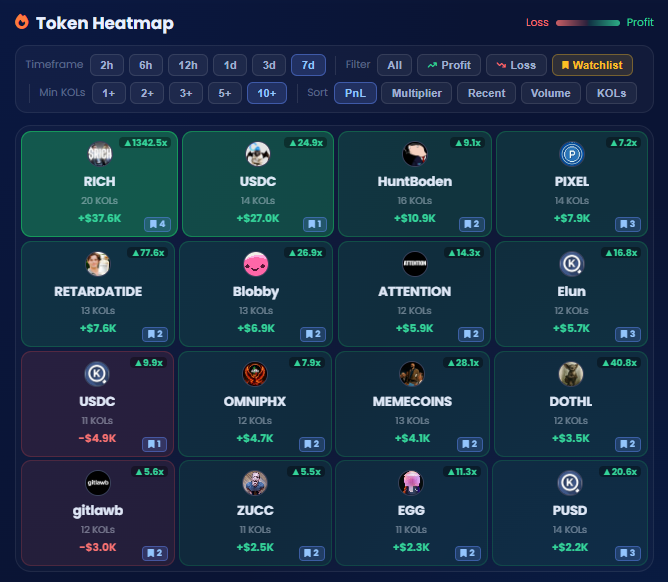
Step 2 – The heatmap loads instantly. You'll see a color-coded grid showing new tokens launched and every KOL who interacted with this token, with green for profitable positions and red for losses.
Step 3 – Use the filters to dig deeper:
- Timeframe: 2h, 6h, 12h, 1d, 3d, 7d — focus on who entered recently
- Performance: All / Profit / Loss — filter to only see tokens who are currently green
- Minimum KOLs: 1+, 2+, 3+, 5+, 10+ — set a conviction threshold before you trust the signal
- Sort by: PnL, Multiplier, Volume, Recent activity, or KOL count
- Watchlist only — Holy show KOLs from your watchlist
5 CONCRETE WAYS TO USE THE TOKEN HEATMAP
1 — Detect new memecoins the moment smart money enters
Set the timeframe to 2h or 6h, sort by Recent. You get a live feed of tokens that KOLs have started accumulating in the last few hours — before any social buzz hits X or Telegram.
If a brand new token already has 3+ profitable KOLs entering within hours of launch, that's an early on-chain signal that's very hard to fake.
2 — Track mindshare evolution over time
A token gaining mindshare shows a clear pattern: KOL count grows over days, average hold time increases, more wallets are green. A token losing mindshare shows the opposite — KOLs exit, count drops, red dominates.
Check the same token at 2h → 1d → 7d to see if influencial interest is building or fading. Is smart money still adding, or have they already rotated out?
3 — Pre-buy conviction check
Before entering any token, paste the CA. If 5+ profitable KOLs have a position and most are green, that's real on-chain conviction — not Twitter noise. If zero KOLs touched it despite heavy hype, that's a red flag.
4 — Exit timing
Already in a token? Check the heatmap. If the early KOLs are now in the red or have exited, smart money has already left. That's usually your answer.
5 — Rug and manipulation detection
High volume, loud community, multiple influencer calls — but zero KOL wallet activity on-chain? That gap between social hype and on-chain conviction is one of the clearest early warning signs of a coordinated pump-and-dump.
TOKEN HEATMAP + WATCHLIST = AUTOMATED EARLY DETECTION
Logged-in users can filter the heatmap to only show tokens traded by their followed KOLs. The workflow becomes fully automated:
- Build a shortlist of 5–10 KOLs whose style matches your risk tolerance
- Enable Telegram alerts for new positions
- Every time a followed wallet enters a new token, you get notified instantly
- Paste the CA in the heatmap or the Telegram bot to check if others followed — and whether they're profitable
No more doom-scrolling X to find plays. Your watchlist becomes a signal machine.
TOKEN HEATMAP VS. LEADERBOARD — TWO SIDES OF THE SAME TOOL
KOL Explorer already let you start from a KOL and see their trades. The Token Heatmap adds the reverse:
- Leaderboard: which KOLs are profitable right now → what are they trading?
- Token Heatmap: I have a token CA → which profitable wallets are in it, since when, and are they still holding?
Together: discover profitable traders → monitor their new token entries → validate conviction before you trade.
FREE TO USE — WITH A PREMIUM LAYER
Basic token lookups are free with no account. Creating a free account unlocks watchlist filtering and real-time Telegram alerts when followed KOLs open new positions.
Register at kolexplorer.com.
BOTTOM LINE
Most Solana memecoin traders rely on social signals — X posts, Telegram calls, chart patterns. The Token Heatmap adds a layer that's much harder to fake: actual on-chain wallet activity from verified profitable traders, visible from the moment a token launches.
Before your next trade, paste the CA. Thirty seconds of on-chain data beats an hour of Telegram research.
Try the Token Heatmap: https://kolexplorer.com/token/
See our full KOL Explorer review: https://solana-trading.com/blog/kol-explorer-review-solana
0 Comments
No comments yet — be the first to share your thoughts!
Leave a Comment